What game UI/UX design actually costs in 2026
The honest answer is a range, not a number. Here are the ranges I see across freelance and studio work, what sits behind each one, how the price moves with platform and genre, and how to write a brief that gets you an accurate quote instead of a guess.
In this article
Open to new projects
Hadjoudj Idris
Game UI/UX Designer
Upwork100% Job Success
Hire me Browse the workNobody publishes this, so every developer ends up asking the same question in a Discord server at midnight. This is what game interface work realistically costs, why the spread is so wide, and how to land on the cheaper end of it honestly rather than by accident.
The short answer
These are typical freelance ranges in USD for 2026. Studios and agencies usually sit two to four times higher, because you are also paying for a producer, an art director, and someone who answers the phone when the designer is ill.
| Scope | Typical range | Usual turnaround |
|---|---|---|
| One polished screen (main menu, results, shop) | $250 – $900 | 3 – 7 days |
| Gameplay HUD, one layout with states | $600 – $2,200 | 1 – 2 weeks |
| Small game, complete menu flow (10 – 15 screens) | $2,500 – $8,000 | 3 – 6 weeks |
| Full UI system: flow, screens, components, handoff | $8,000 – $25,000 | 6 – 14 weeks |
| UI art pass over your existing wireframes | $1,000 – $3,500 | 1 – 3 weeks |
| Usability review of an existing build | $300 – $1,200 | 2 – 5 days |
| Game or studio logo and identity | $300 – $1,500 | 1 – 2 weeks |
| Hourly, experienced freelancer | $25 – $85 / hr | — |
| Part-time monthly retainer | $2,500 – $6,000 / mo | — |
What you are actually paying for
Most quotes get misread because the client is pricing pictures and the designer is pricing decisions. A screen is delivered once. The thinking behind it gets reused across every screen that follows, which is why the second half of a project is always cheaper per screen than the first.
- Flow and structure. Where things live, what happens when a player presses back, how deep the menu tree goes. This is the part that stops players getting lost, and it is invisible in a portfolio image.
- Every state, not the happy path. Empty, loading, error, locked, owned, equipped, disconnected, mid-purchase. A screen with six states is six screens of work and one screen of applause.
- Input parity. Mouse, gamepad, touch and keyboard navigation each need a defined focus order. Adding controller support after the layout is locked is the most common reason a UI gets rebuilt.
- Readability under pressure. A HUD that works in a still frame and dies at speed is not finished. See seven HUD mistakes that make players quit.
- A component set. Buttons, panels, sliders, tabs and cards defined once and reused. This is what makes screens 15 to 30 cost less than screens 1 to 5.
- Handoff. Named layers, assets exported at the right densities, a spec a developer can implement without a call. Bad handoff is a hidden cost you pay in your programmer's hours instead of your designer's.
A useful way to sanity-check a quote: ask how many of those six the price covers. A cheap number that only covers the second one is not cheap, it is partial.
What changes the number most
In rough order of impact. The first three routinely double a quote; the last three add 10 to 30 percent each.
- Systems, not screens. Inventory, skill trees, crafting, live-ops shops, loadouts. Anything with rules attached costs a multiple of a static screen, because the design has to hold for every combination the rules allow.
- Console certification. Controller navigation, safe areas, platform holder requirements and layouts that survive translation all add real, non-negotiable work.
- No art direction yet. If the game has no visual language, part of what you are buying is that language being invented, and invention is slower than application.
- Localisation. German runs roughly a third longer than English, and CJK needs different line breaking and larger minimum sizes. Designing for it is a day-one constraint, not an end-of-project fix.
- Accessibility. Colourblind-safe states, scalable text, contrast that clears WCAG, remappable controls. Far cheaper designed in than retrofitted, and increasingly expected on store pages.
- Motion and juice. Transitions, feedback and micro-animation are a separate discipline. Speccing them properly is worth it, but it is not free.
- Rush. Anything under a normal schedule carries a premium, usually 25 to 50 percent, because it displaces other committed work.
Cost by platform
Same screen count, different amount of work. These multipliers are applied to the base ranges at the top of the article.
| Platform | Multiplier | Why |
|---|---|---|
| PC, mouse and keyboard | ×1 (baseline) | One input model, generous screen space, forgiving resolution range. |
| Mobile | ×1.1 – 1.4 | Thumb zones, small targets, notches and safe areas, plus portrait and landscape if you support both. |
| Console | ×1.3 – 1.8 | Full gamepad focus order, TV-distance legibility, title safe areas, certification requirements. |
| PC and console together | ×1.5 – 2 | Every screen designed twice over: pointer and focus navigation must both feel native, not ported. |
| VR and AR | ×1.8 – 2.5 | Depth, comfort, curved layouts, ray or hand input, and a legibility problem that has no flat-screen equivalent. |
Cost by genre
Genre is a proxy for how much information the interface has to carry, which is the real cost driver.
| Genre | Screens & systems | Typical full-UI band |
|---|---|---|
| Puzzle, platformer, arcade | Light. A menu flow and a thin HUD. | $2,500 – $6,000 |
| Racing, sports | Medium. Setup, garage, results, telemetry HUD. | $5,000 – $14,000 |
| Shooter, action | Medium to heavy. Loadouts, progression, live HUD. | $7,000 – $18,000 |
| RPG, survival, crafting | Heavy. Inventory, stats, map, crafting, dialogue. | $12,000 – $28,000 |
| Strategy, 4X, management | Heaviest. Dense panels, tooltips, tutorial systems. | $15,000 – $35,000 |
| Mobile free-to-play | Heavy and ongoing. Shops, events, offers, retention loops. | $10,000 – $30,000 plus retainer |
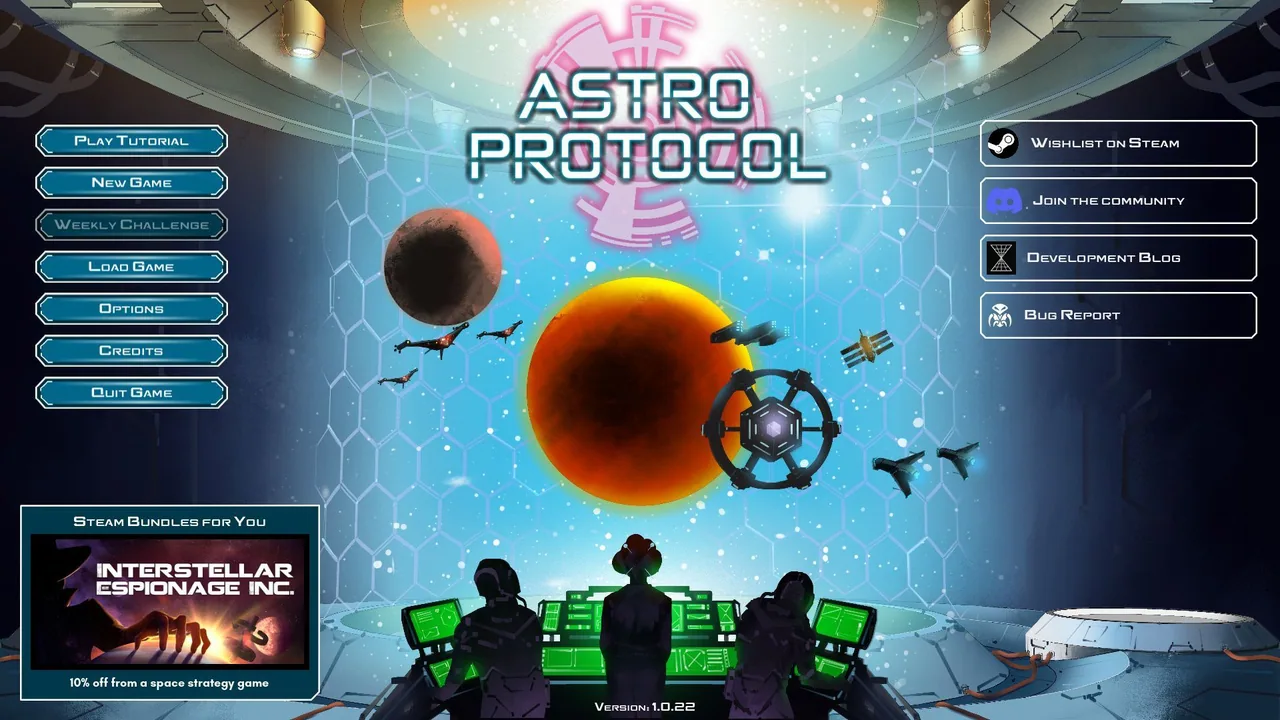
Strategy sits at the top for a reason. On Astro Protocol, a turn-based 4X shipped on Steam, the hard part was never drawing a panel: it was giving dozens of resources, factions and ship states a fixed, predictable home so the hex map stayed readable underneath all of it.
Hourly, fixed price, or retainer?
| Model | Best when | Watch out for |
|---|---|---|
| Fixed price | The scope is known: a defined screen list and a defined number of revision rounds. | Scope creep gets expensive on both sides. Put the screen list in the contract. |
| Hourly | Exploration, ongoing tweaks, or a design lead embedded with the team. | You are buying time, not an outcome. Ask for a weekly cap and a short written log. |
| Monthly retainer | Production is continuous and UI keeps arriving in waves. | Agree what a month buys, otherwise it quietly becomes on-call support. |
| Per screen | A short, well-defined top-up: three screens, nothing else. | Encourages screens without a system behind them. Bad value past about five. |
For most indie projects, fixed price on a defined screen list is the safest structure. You know your exposure, the designer knows where the finish line is, and neither of you is watching a clock during a creative conversation.
Freelancer, studio, or an in-house hire?
The sticker prices are not comparable, because only one of the three has a floor under it.
| Option | Real cost | Fits when |
|---|---|---|
| Freelancer | $25 – $85 / hr, or a fixed project price. No overhead, no notice period. | Under about 30 screens, or a defined slice of a bigger project. |
| Studio or agency | $80 – $200 / hr. You are buying capacity and cover as well as design. | Large scope, multiple parallel workstreams, procurement that needs a company. |
| In-house designer | Salary plus 25 – 40 percent in employer costs, tools and management time. | Interface work is continuous for a year or more, not a phase. |
The honest test for in-house: is there twelve months of interface work, and is somebody able to direct it? If either answer is no, a freelancer or a retainer costs less and delivers faster.
What brings the price down, honestly
Not haggling. These four actually reduce the hours, which is the only thing that reduces the cost without reducing the result.
- 01
Bring a screen list
A numbered list of every screen and every state you know you need. Half of a first-round quote is padding for the screens nobody has counted yet.
- 02
Decide who signs off before you start
One decision maker. Design by committee is the most expensive process in games, and you pay for it in revision rounds.
- 03
Give real content, not placeholder text
Actual item names, the actual longest string, actual numbers. Layouts break on real content, and they break late if you supply it late.
- 04
Buy the system, then extend it yourself
Commission the flow, the component set and three or four flagship screens. A capable team can apply an established system to the remaining screens in-house, and that is where the real saving is.
How payment usually works
Nothing here is exotic, but knowing the shape of it stops the money conversation from feeling like a negotiation.
- Deposit. 30 to 50 percent up front on fixed-price work is standard. It reserves the schedule, which is the thing you are actually buying.
- Milestones. Payments tied to deliverables rather than dates: wireframes approved, visual direction approved, screens delivered, handoff complete.
- Escrow. On platforms like Upwork the funds sit in escrow per milestone, which protects both sides. It is the reason a lot of first-time clients start there.
- Final files on final payment. Normal and reasonable. Working files are usually released when the last milestone clears.
- Kill fee. If the project is cancelled mid-milestone, the work completed to that point is invoiced. Agree the principle before you need it.
Revisions: what is included and what is not
Revision rounds are where fixed-price projects go wrong, almost always because nobody defined what a round is.
| Usually included | Usually a change order |
|---|---|
| Two or three rounds per milestone, consolidated into one list | A fourth and fifth round of the same screen |
| Adjusting spacing, hierarchy, colour, copy placement | A new art direction after the direction was approved |
| Fixing something that does not match the agreed brief | Adding screens, states or a feature that was not on the list |
| Small corrections after handoff | Re-cutting assets for a platform that was not in scope |
What a very cheap quote usually costs later
There is nothing wrong with a junior rate. There is something wrong with a rate that could only be met by skipping work. The three things that get skipped are always the same: states, input parity and handoff.
The cheapest UI I have been asked to fix cost a few hundred dollars. Rebuilding it, after it shipped and the reviews arrived, cost several times that.
The pattern is predictable. The screens look fine in the pitch, then the developer discovers there is no disabled state, no long-name case, no controller focus order, and no exported assets at the right size. Every one of those becomes an engineering decision made under deadline, which is the most expensive way to make a design decision.
How to read a quote
A good quote is boring and specific. Look for these line items, and treat their absence as a question rather than a discount.
- A screen list, numbered, with states named per screen.
- The inputs covered: mouse, gamepad, touch, keyboard.
- Whether wireframes are a separate stage with their own sign-off.
- The number of revision rounds and what counts as one.
- Deliverables: source files, exported assets, sizes, formats, a spec document.
- Timeline with milestones, and what happens if your feedback is late.
- Ownership: who holds the working files and the rights after final payment.
Before you sign, ask for one more thing: a full case study, not a hero shot. If a designer cannot show you the boring screens, the empty states and the reasoning, you are buying an image, and you will end up supplying the design work yourself in feedback rounds. The case studies here are written that way on purpose.
Three realistic budgets
- 01
Small premium indie, one platform, around $3,000
Wireframed flow, main menu, settings, pause, results and a light HUD, one visual pass, source files and exported assets. Enough to look intentional rather than default.
- 02
Mid-size title with progression, around $12,000
Full flow, 20 to 30 screens with states, a documented component library, controller navigation, a HUD tuned in motion, and implementation support during the build.
- 03
Ongoing production, around $4,000 per month
A designer inside the team for the run of production: new features as they land, live QA of the interface, and one owner keeping the visual language consistent as scope grows.
For a sense of what the middle tier delivers in practice, Nocturne Drive covers a complete player journey, career hub through to in-race HUD, built as one system rather than a set of screens.
How much does a game main menu cost?
Between roughly $250 and $900 for a single polished screen with its states, depending on how much of the visual language already exists. If the game has no established art direction yet, expect the upper end, because part of the work is inventing that language.
How much does a game HUD cost?
Typically $600 to $2,200 for one layout with its states, tuned against real gameplay footage. Multiple modes, vehicle and on-foot variants, or a competitive game where every frame matters push it higher.
Is game UI design more expensive than app UI design?
Usually yes, for the same screen count. Games add controller navigation, animated states, unusual resolutions, art-directed rather than system components, and readability requirements under motion. Very little of a game UI can be assembled from an off-the-shelf component library.
Should I pay for wireframes if I already know what I want?
Yes, and they are the cheapest part of the project. Wireframes are where a flow problem costs an hour to fix instead of a fortnight. Skipping straight to finished art is how projects end up paying for the same screen twice.
Can I just buy a UI kit from an asset store?
For a jam game or a prototype, absolutely. For anything you are asking players to pay for, a kit gets you components but not a flow, and reviewers recognise popular kits on sight. A practical middle path is covered in indie game UI on a budget.
How long does a full game UI take?
A complete system for a mid-size title is typically 6 to 14 weeks of design work, running in parallel with development rather than in a block at the end. Bringing a designer in during production, not after it, is what keeps that number down.
What deposit is normal?
30 to 50 percent up front on fixed-price work, with the balance split across milestones. On a platform with escrow, funding each milestone before it starts does the same job.
Who owns the design files after the project?
Whatever the contract says, so make it say something. The common arrangement is that you own the delivered work and the source files on final payment, and the designer keeps the right to show it in a portfolio. If the project is confidential, agree an embargo rather than a blanket ban.
How do I brief a designer if I do not know the terminology?
Describe player moments rather than screens: what the player is trying to do, what they need to know, what usually goes wrong. Naming the screens is the designer's job. There is a full brief template in how to hire a game UI/UX designer.
Hadjoudj Idris
Game UI/UX Designer, Remote, worldwide
Need this done properly on your game?
Menus, HUDs, a full UI system, or one screen that isn't working. Tell me what you're building and I'll tell you honestly whether I'm the right fit, and what it would cost.
Upwork100% Job Success